One device.
Many phones.
Total separation.

Real Android phones that live on a server, streamed to your device in real time.

SidePhone gives you full Android phones — running GrapheneOS, the privacy-hardened Android — that you reach from your Android, iPhone, or browser. Work apps and accounts live on a phone that runs on your own server, or ours, with nothing stored on the handset. Keep as many SidePhones as you need. No second device, no MDM agent crawling through personal life.

GrapheneOS · self-host or hosted · android · ios · web · private beta

Provision. Install. Stream.

A virtual Android phone runs on the server. Your physical device just streams it on demand — no work apps installed, no work data stored locally.

Request access →
01  / provision

Spin up a virtual phone.

An admin creates virtual Android phones from the manager — self-hosted on your own server or cloud, or on our hosted infrastructure. Each one runs GrapheneOS server-side, as its own virtual machine, with its own apps, accounts and data.

deploy: self-host · or hosted
02  / install

Install the app, or open the web.

Use the SidePhone app on Android or iOS, or just a browser. Pair to a phone with a one-time access token. Add as many phones as you're given — they all show up in one place.

clients: android · ios · web
03  / stream

Tap to stream it live.

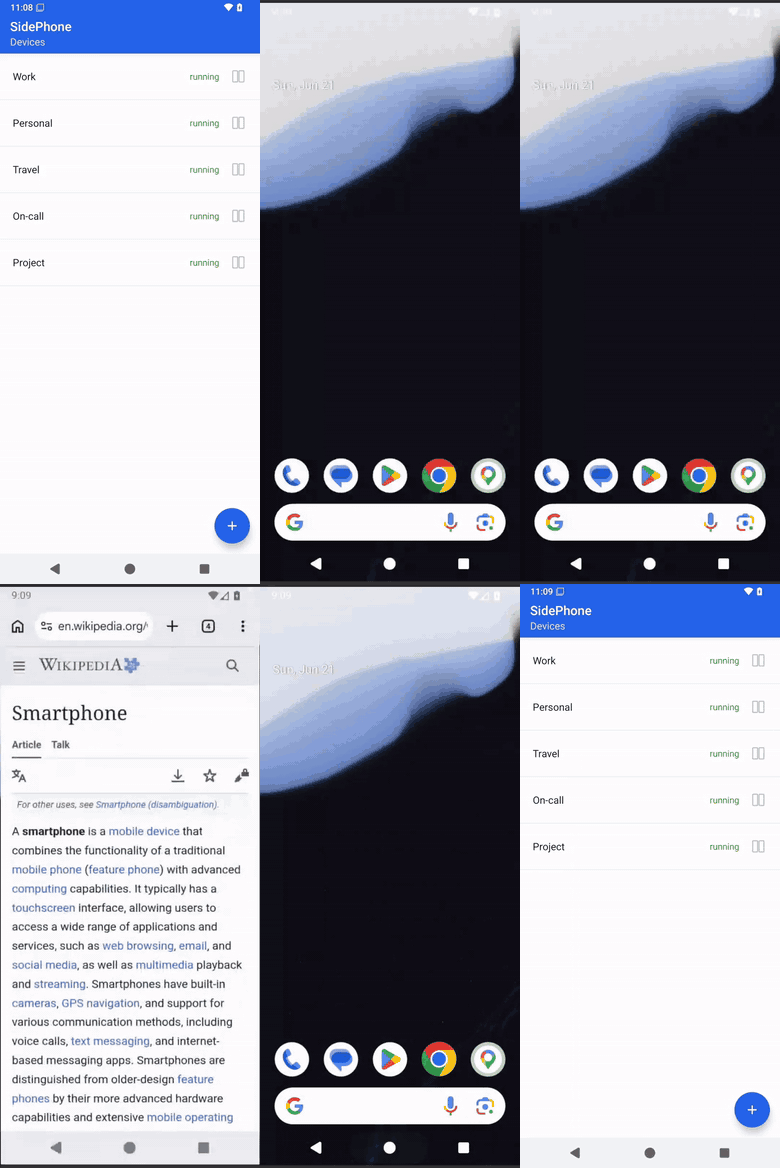
Open a phone and it streams to your screen in real time over WebRTC — tap, type, and use it like a local phone. Your camera, microphone and location are shared only while an app on it asks for them. Work apps and data stay on the server; nothing is stored on your handset.

stream: WebRTC · always encrypted
The SidePhone app: tapping a phone opens the live remote Android phone, streamed in real time.

Five reasons it replaces the second handset.

A clean separation between personal and corporate, without the friction or surveillance that comes with the status quo.

// secure by design

Work data lives where you put it.

The virtual phone runs on your server — never alongside personal apps. Each one is its own virtual machine on a hardened host, kept apart from the other phones and from your network. Every session is encrypted, and nothing work-related is stored on the physical handset.
✓ a virtual machine per phone hardened host
✓ kept apart from the other phones segmented
✓ nothing stored on the handset stream only
✕ MDM agent watching personal apps
// convenient

Many phones, one app.

Keep as many virtual phones as you need — work, on-call, projects — all in the same app. Open one, use it like a local phone, switch to another. A phone you are not using can sleep and wake when you open it, or stay permanently on when it has to stay reachable. No reboot, no second device.
personal
your handset
work · pixel
virtual phone
// sustainable

One handset, not three.

Manufacturing a smartphone uses a battery, rare metals, and a plastic shell — and most corporate phones are barely used. Eliminating second and third devices halves an employee’s footprint. On the server, phones nobody is using give back what they were holding instead of burning it, so a fleet costs what it is actually used for.
devices per employee 3 → 1
batteries manufactured −66%
e-waste at end of life −66%
individual footprint cut by half
// your infrastructure

Run it on your own server.

Self-host SidePhone on your own hardware or cloud and the phones never leave your infrastructure — or use our hosted service while you evaluate. Deployments come with the same hardening our own service runs on, and the full administrator’s guide.
✓ self-host on your own server your infra
✓ or use our hosted service private beta
✓ hardened by default defence in depth
✕ your data in someone else's cloud
// privacy

Your camera and microphone stay yours.

A virtual phone can use your camera, microphone and location — but only while an app on it is actually asking for them. You see it on screen while it happens, and every use is listed afterwards. The rest of the time the phone has no sensors at all.
✓ shared only while an app uses them per app
✓ shown on screen while it happens visible
✓ every use listed afterwards history
✕ a phone watching in the background

Built for the people who shouldn't be carrying three phones.

Anyone with strict data rules, on-call rotations, or work that follows them across borders. Doctors were our first design partner; the same problem shows up everywhere.

// healthcare
Hospital staff
Patient data and work apps stay server-side, off the personal handset — across shifts and wards.
// legal & finance
Attorneys & accountants
Privileged client data has to stay inside the firm. Personal device can stay personal.
// defense & gov
Contractors & field staff
Sensitive data never touches the handset. If the device is lost, nothing leaks with it.
// leadership
Executives
A clean separation between board comms and the family group chat. No work profile theater.
// remote work
WFH employees
Corporate apps without shipping a second handset to every home office.
// travel
Journalists abroad
Source material stays in the newsroom's server. Cross borders carrying just your personal phone.
// disposable
Untrusted apps & one-offs
Spin up a SidePhone to isolate a nosy or sketchy app, or to hand a contractor a phone for one project — keep it off your personal device and delete the whole thing when you're done.
// shared
On-call & shared devices
Hand off a shared virtual phone between colleagues — no extra hardware to pass around.

Questions, answered.

Short version: it's a virtual Android phone you stream from a server you run — or one we run. In private beta. Happy to walk you through it.

Request access →
What exactly is a SidePhone?

A SidePhone is a full Android phone — apps, accounts, files — that runs on a server as its own virtual machine. It runs GrapheneOS, the privacy-hardened Android. The device you hold just streams it in real time, and nothing important is stored on the handset.

What Android do the phones run?

GrapheneOS by default — the privacy-hardened Android, without Google services unless you add them. Stock Android images are available for the cases where an app needs them.

Can a phone see my camera or microphone?

Only while an app on that phone is actually using it. You see it on screen while it happens, and every use is listed afterwards, per phone. The rest of the time the phone has no camera, no microphone and no location at all.

What keeps one phone away from another, or from my network?

Each phone is its own virtual machine, and the infrastructure around it follows defence-in-depth practices to keep phones strongly segmented — from each other, from the server they run on, and from the network it sits in.

Do the phones run all the time?

That is yours to choose, phone by phone. A phone can sleep when nobody is using it and wake when you open it, or stay permanently on when it has to stay reachable. Sleeping phones give their resources back, so a fleet costs what it is actually used for.

How is this different from MDM?

MDM manages a physical device, then trusts that device with corporate data. SidePhone never puts work data on a personal handset to begin with. There's nothing to wipe remotely, nothing to leak when the phone is stolen, and no agent watching the user's personal life.

Where does the data live?

Wherever you choose: self-host the manager and virtual phones on your own server or cloud, or use our hosted service. Either way the data stays in the instance you run.

Can one user have multiple SidePhones?

Yes. As many as you're given — work, on-call, per-project — all in the same app. You pick which one to open, use it, and switch to another.

Which devices do I need?

Your own. The SidePhone client runs as an app on Android and iOS, or in any browser, on whatever device you already have. No corporate hardware to procure, ship, or recycle.

How do I get access?

SidePhone is in private beta. Email info@sidephone.io with a bit about your use case and we'll set you up — self-hosted or on our infrastructure.
Try SidePhone in private beta.

We are in private beta. Tell us a bit about your use case and we'll set you up with access — self-hosted on your own infrastructure, or on ours.

self-host or hosted · info@sidephone.io